
Stores Articles
Checking a defence
How to Look Up a Player’s Airsoft Defence Status
Retailers can use the Airsoft Defence dashboard to find a registered player and check their current defence status. A player can be found by scanning their QR code or by searching for their details manually.
Step 1: Select Find Player
From the retailer dashboard, select Find Player.

Step 2: Choose How to Find the Player
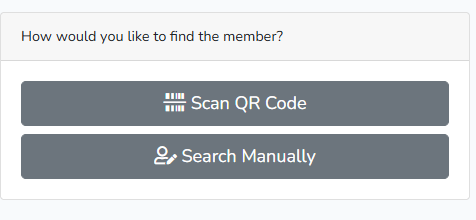
You will be given two options:
Scan QR Code
Search Manually
Finding a Player Using Their QR Code
Select Scan QR Code and use your device to scan the QR code provided by the player.
When the code has been scanned successfully, the player’s profile will load automatically. You can then review their details and current defence status.
Finding a Player Manually
Select Search Manually if the player cannot provide a QR code or if you prefer to search using their account details.
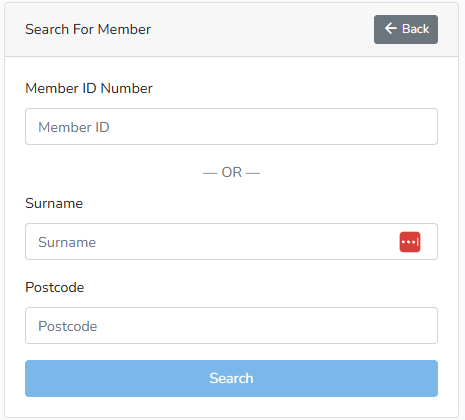
There are two ways to complete a manual search:
Search by Player ID
Enter the player’s ID number in the Member ID Number field and select Search.
You do not need to enter their surname or postcode when searching by player ID.
Search by Surname and Postcode
Enter both the player’s surname and postcode, then select Search.
Both fields are required when using this search method. Check that the spelling and postcode match the details registered to the player’s account.
Checking the Defence Status
If a matching player is found, their profile will load and display their current defence status.
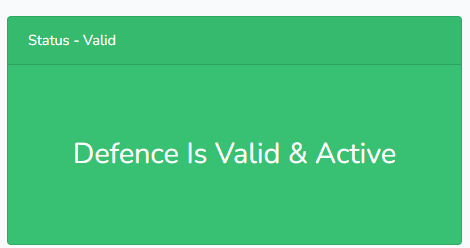
A green Defence Is Valid & Active message confirms that the player’s Airsoft Defence record is currently valid.
Before proceeding, check that the profile belongs to the person making the purchase. Review the player’s displayed details and profile photograph as part of your normal verification process.
Airsoft Defence provides supporting evidence of a player’s airsoft activity. It does not create the statutory defence, and the retailer remains responsible for deciding whether there is sufficient evidence to proceed with a transaction.
If the Player Cannot Be Found
If no matching profile is returned:
Check that the player ID was entered correctly.
If searching by personal details, check both the surname and postcode.
Ask the player whether their registered details have recently changed.
Try the other search method where possible.
Do not assume that a defence is valid if the correct profile cannot be located.
Reasons a Defence May Not Be Valid
A player’s defence may be unavailable, inactive or invalid for several reasons.
Account not verified
Players details have not been verified by a participating game site
Under 18
Player account DOB means that the player is under 18 years of age
Police Hold
Police have issued a hold on this player account. There should be a note on the account that explains the hold more
Not enough games played
Player has not logged enough games on the system to satisfy the requirements to prove they are a consistent airsoft player
No games in the past 12 months
A game needs to be logged in airsoft defence once every 12 months
Account Disabled
Players membership has expired and a payment to airsoft defence is required to reactivate the account
Over 12 penalty points
Player has racked up 12 or more points in the past 12 months for behaviour at game sites. Advise they speak with game sites they played at.
Need More Help?
If a player believes that their displayed status is incorrect, ask them to contact Airsoft Defence support. Retailers should not attempt to change a player’s account or defence status on their behalf.